![[Image: RBAC permission matrix showing role hierarchies, group assignments, and effective permission summary]](https://oxkshbexfevzroylleqp.supabase.co/storage/v1/render/image/public/teamsync-media/chatgpt-image-aug-1--2026--01-57-43-pm-1785572789686.png?width=1920&height=1920&quality=75&resize=contain)
Drive enterprise transformation with
RBAC + Backup
Control who can view, edit, and share information with granular role-based permissions.
Fine-Grained RBAC
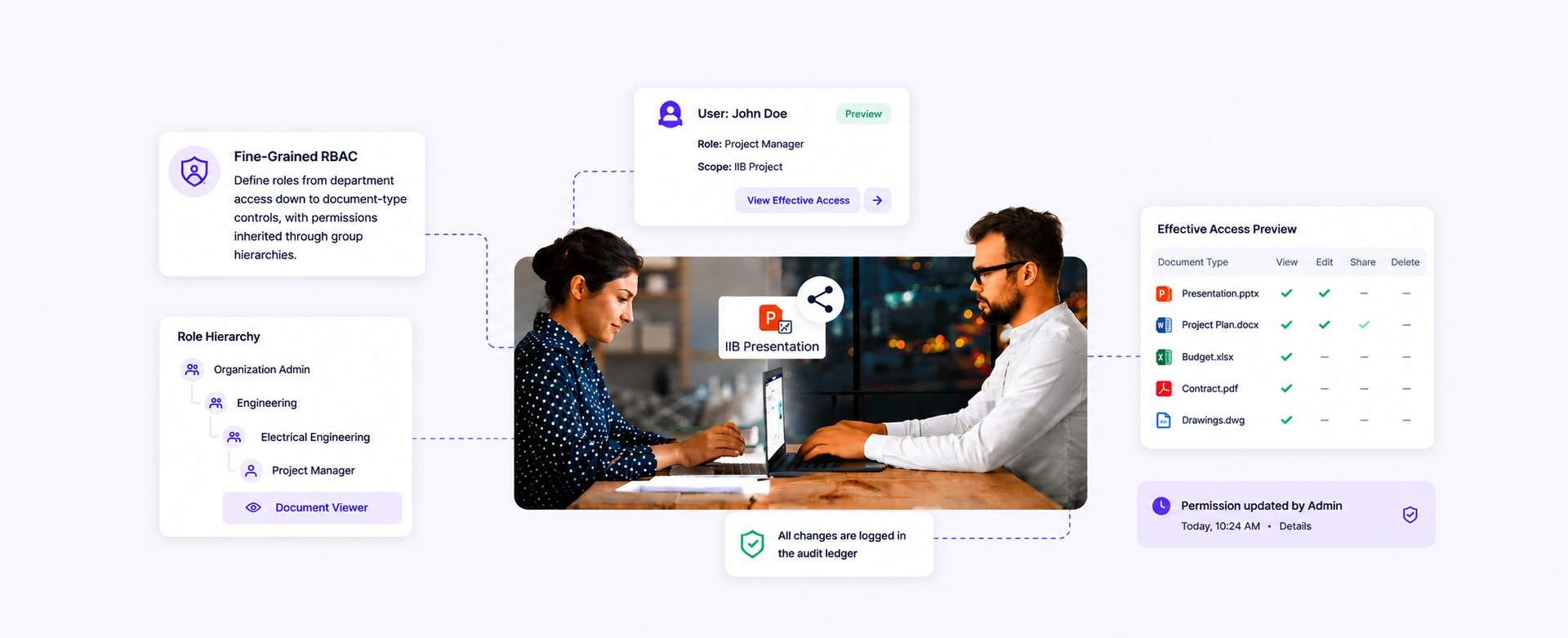
Define roles from broad department access down to document-type-level controls, with permissions inherited through group hierarchies. An admin preview shows exactly what a user will have before you save, and every change hits the audit ledger
What Your Team Actually Gets
Zero-ambiguity permissions
Role hierarchies and effective-permission preview mean no one is accidentally over-privileged or locked out
Auditable access history
Every permission change is written to the tamper-evident ledger — you can answer "who had access on X date" without guessing.
Verified backups
Every backup is checked for integrity on completion so corruption is caught before you need to restore — not during
Testable restore
Dry-run restores to a sandbox prove your recovery plan works before it is tested under pressure by an actual incident
How Enterprises Use TeamSync Every Day

Bank passes regulator access-control audit with complete permission-change history
The regulator requests permission history for a specific trading system folder. The tamper-evident audit ledger provides a complete, timestamped, cryptographically-verified record of every access grant and revocation going back five years

Hospital tests and validates full DR restore in a 2-hour window
The IT team runs an annual DR test using point-in-time restore to a sandbox environment. The test completes in 2 hours and produces a verified report confirming RPO and RTO targets are met

Government department enforces least-privilege RBAC across 4,000 users with zero manual review
Role hierarchies aligned to the organisational chart auto-assign correct permissions as employees join, move, and leave. Quarterly access reviews are generated automatically from the permission history — no manual spreadsheet compilation
RBAC, Backup & Restore FAQs.
Let's clear things up.
We know — role models, recovery targets and restore drills can feel overwhelming. TeamSync brings access control and resilience into one place.
Whether you are onboarding a department or testing a recovery plan, we are here to make it predictable.
RBAC grants permissions to roles rather than to individuals, and people inherit access from the roles they hold. Roles here compose from groups, document types, metadata values and workspace membership, down to the individual document and field.
RBAC decides from who someone is in the organisation. ABAC decides from attributes of the request - document type, classification, metadata values. TeamSync uses both, so a role sets the baseline and attributes narrow it for sensitive material.
Every permission change is written to the tamper-evident ledger, so 'who had access on this date' is a query rather than a reconstruction. Quarterly access reviews generate from that permission history instead of being compiled by hand.
Backups run continuously as incrementals with a configurable full-snapshot cadence. A single document version restores in seconds and a full workspace in minutes; the specific targets are set per environment during deployment.
Restore rights are themselves a permission, so only roles you grant can perform one, and the restore is written to the same audit ledger as every other action. Restores can also be staged into an isolated environment for a drill that produces evidence without touching production.
30 minutes with a solutions engineer who already speaks your industry.
No pitch deck. We will either show you a clear path forward or tell you we are not the right fit. Bring the toughest question on your desk this week.